Monday, 15 October 2018

Bringing Samsung DeX to Life


on October 11, 2018


When Samsung launched the Galaxy S8/S8+ they took mobile computing to a new level with the first appearance of Samsung DeX, the ultimate mobile productivity solution delivering a PC-like experience from anywhere, that now comes standard on the company’s flagship devices.

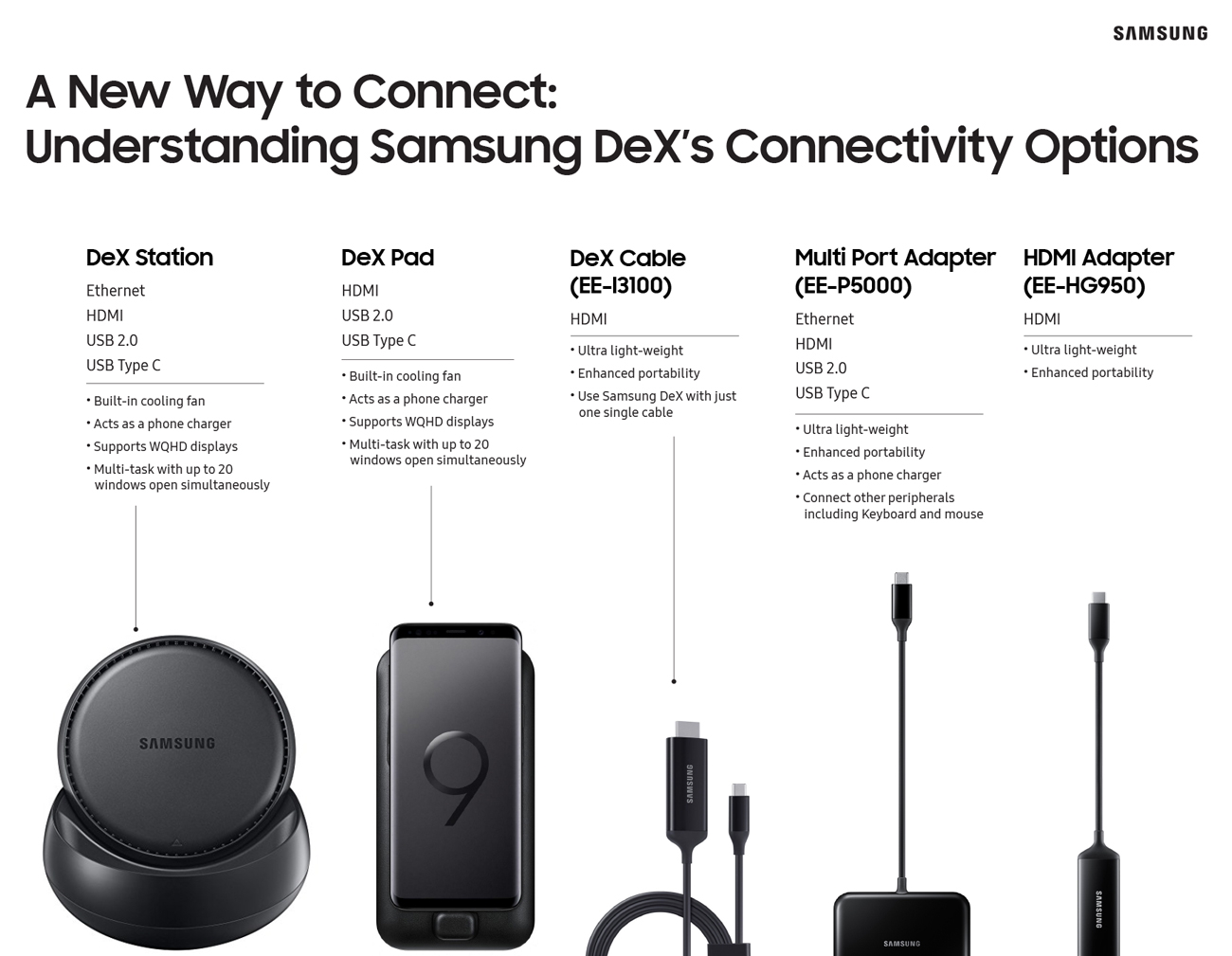
With the initial release of Samsung DeX, and its companion DeX Station, in 2017, Samsung sought to bring a PC-like experience to the smartphone. Since then, the company has introduced a variety of new accessories to make it easier to use the service, each with its own features and functionality to help people connect in the way that suits them best. Check out the infographic below to see exactly how Samsung DeX has evolved over the last year.


01. The Idea


To allow people more versatility, we created a wider variety of connectivity options with different features that suited their unique needs. Not only did we want to enable people to get more done on the go, we wanted them to be able to enjoy new ways of entertainment including using your smartphone as a sketchpad or playing full-screen mobile games, without the need to carry multiple devices. We also wanted to allow people to still use their phones while using Samsung DeX for a more seamless experience.

02. The Result


With the three new options, there are now five ways to use Samsung DeX to meet the needs of various types of users: Samsung’s HDMI Adapter, Multi Port Adapter, DeX Cable, DeX Pad, and DeX Station. The DeX Station and DeX Pad offer the power to open more windows, leverage higher-resolution screens and charge your device, while the HDMI and Multi Port solutions provide a convenient option for users on-the-go. The low-cost HDMI and Multi Port solutions also provide a much lower barrier to entry for using Samsung DeX and can also be used as regular HDMI adapters.

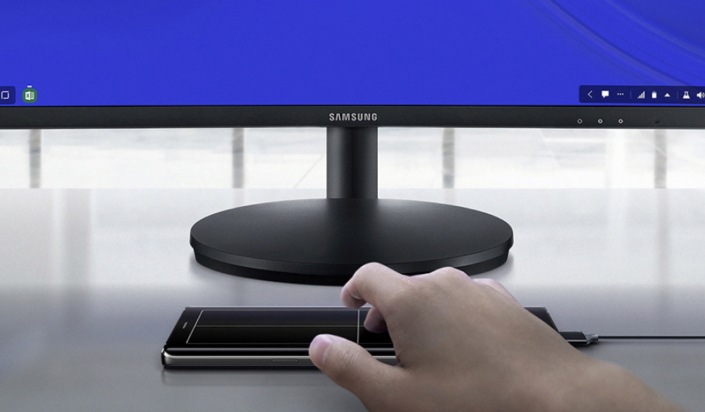
For the Galaxy Note9, we added S Pen integration so that users can take notes or advance slides while their phone is connected to an external monitor. With these updates, using Samsung DeX is more practical than ever, with options that cater to portability, convenient connectivity, a seamless experience with Dual Mode, and support for third party partnerships including Microsoft and Adobe.

03. The Problem
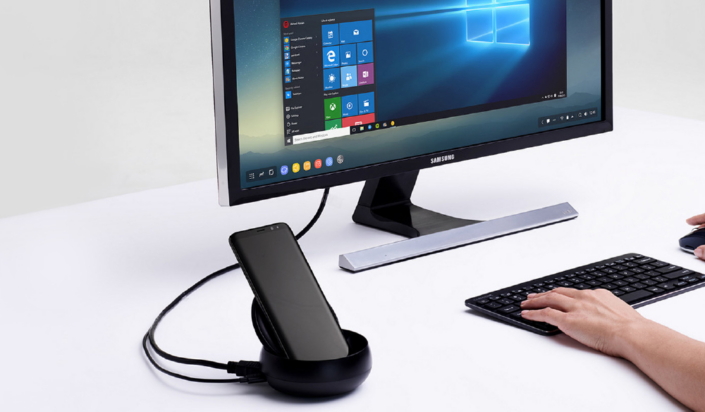

With the launch of DeX Station, we proved that we could harness the increased power of the Galaxy flagship phones to increase productivity. You could now connect your phone to a monitor and use it much like you would on a desktop to open multiple windows or connect a keyboard and mouse to write emails, play games, conduct video conference calls, and more. But it was missing one small thing: get-up-and-go mobility.

The 2nd generation of Samsung DeX’s accessories, the DeX Pad, answered some of the shortcomings of the DeX Station in more mobile-friendly way by adding additional functionality, allowing you to turn your smartphone into a touchpad or keyboard. But still, there were opportunities to provide users with more seamless and easier ways to use Samsung DeX.

04. The Solution
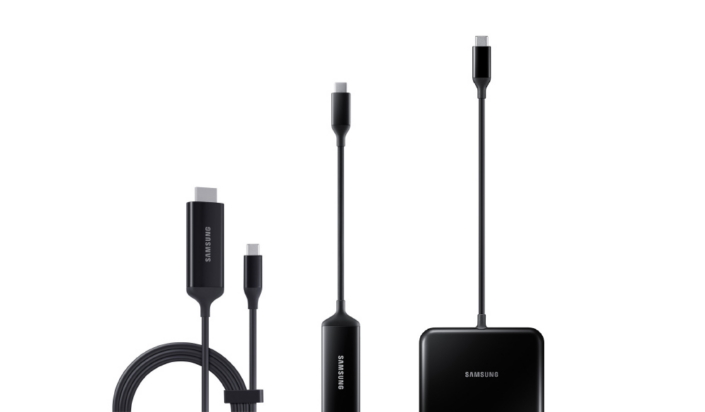

We made Samsung DeX compatible with simple HDMI adapters, including Samsung’s Multi Port Adapter, and DeX Cable, giving users more portable and convenient options to connect to Samsung DeX, each offering unique benefits and connectivity options. When connected via an HDMI adapter or DeX Cable, users can simultaneously access content on a monitor and continue to use their phone as normal while connected to Samsung DeX.

05. The Goal

We wanted to grow beyond the DeX Station and DeX Pad and approach Samsung DeX as a mobile productivity service and ecosystem that could change how we use our mobile devices. More than two peripheral accessories, we wanted to expand our offerings to provide a more compact and seamless experience for users so they could enjoy a PC-like mobile experience in much easier and various ways. For example, we wanted to make it possible to use Samsung DeX without dedicated accessories, and for users to still use their smartphones while connecting to the service.
Live in the Moment with the Galaxy A9

October 11, 2018

 Capture and share your experiences as you see them


Samsung Electronics today announced the Galaxy A9, a smartphone built for those who love to explore, capture the moment and share it as they see it. The pioneering Galaxy A9 debuts the world’s first rear quad camera and is packed with features designed to help you live each day to the fullest.

Whether it’s capturing a dare-devil selfie or that perfect panorama, the Galaxy A9 is the ultimate companion for capturing and sharing everyday adventures, no matter where life takes you.The Galaxy A9 is tailored for those who know what they want, and go after it. 

That’s why the Galaxy A9 is packed with Samsung’s best camera innovations, to enable all consumers to achieve more, experience more and unlock more possibilities every day.

In an exciting and connected world where moments and memories, from the everyday to the once-in-a-lifetime, are captured and shared instantly, the smartphone has become so much more than just a phone to consumers.


“As a global leader in smartphone innovation, we understand the demand for meaningful innovation in a fast-paced world driven by visual communication," . President and CEO of IT & Mobile Communications Division at Samsung Electronics. “Building on our legacy in smartphone camera development we’re introducing next-generation technology across our entire Galaxy portfolio to give more consumers the opportunity to experience cutting-edge innovation. We’re excited to deliver on this promise and debut world leading smartphone camera technology with the Galaxy A9.”

Powerful New Features for Exceptional All-day Performance


Designed to make life more convenient, the Galaxy A9 features Bixby2, Samsung Pay3 and Samsung Health and you can take advantage of the many multi-tasking benefits the Galaxy A9 offers, including App Pair.

 You can now capture everything, without restriction, store more and delete less with the Galaxy A9’s 128GB storage and up to 512GB of expandable memory.The reliable 3,800mAh1 battery life on the Galaxy A9 lets you live without limits and enjoy outstanding long-lasting performance.

The Innovative Rear Quad Camera

The Galaxy A9 allows you to capture dynamic and beautiful photos effortlessly. With four lenses, experience even more ways to unleash your creativity and capture, create and share stunning images.

  • Express your creativity with the Depth Lens, giving you the freedom to manually manage the photos’ depth of field and focus on the subject for stunning, professional looking images.
  • Get close without compromise with 2x Optical Zoom for incredible and detailed close-up shots even from far away.
  • Capture the world in its fullest and without limit, with the Ultra Wide Lens, and shoot like a pro with the Scene Optimizer. Thanks to AI Scene Recognition, your camera is now smarter, and able to identify the subject and adjust settings accordingly for the best photo, in an instant.
  • Capture clear and bright images in both bright and low light conditions with Galaxy A9’s24MP Main Lens, for gorgeous photos at any time of the day.

First Class Design

Building on Samsung’s heritage in first-class design, the Galaxy A9 is styled in three unique colors; Caviar Black, Lemonade Blue and Bubblegum Pink4 with a sleek and ergonomic design, that fits in one hand with a 3D Glass curved back for a high-quality comfortable feel.

The Galaxy A9 will be available in selected markets from November.

For more information about the Galaxy A9, visit news.samsung.com/galaxy, www.samsungmobilepress.com or www.samsung.com/galaxy

Samsung Galaxy A9 Product Specifications

Display6.3” Full HD+ Super AMOLED, 1080×2220
*Screen measured diagonally as a full rectangle without accounting for the rounded corners
CameraRear: quad camera
– Main Camera : 24MP AF, F1.7
– Telephoto : 2X optical zoom, 10MP AF, F2.4
– Ultra Wide : 120°, 8MP, F2.4
– Depth : 5MP, F2.2Front: 24MP, F2.0
Body162.5 x 77 x 7.8 mm, 183g
APOcta Core (2.2GHz Quad + 1.8GHz Quad)
Memory56GB RAM, 128GB + MicroSD Slot (up to 512GB)
8GB RAM, 128GB + MicroSD Slot (up to 512GB)*
*May differ by market and mobile operator
*User memory is less than the total memory due to storage of the operating system and software used to operate the device features. Actual user memory will vary depending on the operator and may change after software upgrades are performed
Battery3,800mAh (typical)
*Typical value tested under third-party laboratory condition. Typical value is the estimated average value considering the deviation in battery capacity among the battery samples tested under IEC 61960 standard. Rated (minimum) capacity is 3,720 mAh. Actual battery life may vary depending on network environment, usage patterns and other factors.
OSAndroid 8.0 (Oreo)
Network3CA, LTE Cat.9
ConnectivityWi-Fi 802.11 a/b/g/n/ac (2.4/5GHz), VHT80 MIMO,  Bluetooth® v 5.0 (LE up to 2Mbps), ANT+, USB Type-C, NFC, Location (GPS,  Galileo*, Glonass, BeiDou*)
*Galileo and BeiDou coverage may be limited.
PaymentSamsung Pay (NFC)*
*The availability may vary by country, device, feature, card issuer and merchant
SensorAccelerometer, Fingerprint Sensor, Gyro Sensor, Geomagnetic Sensor, Hall Sensor, Proximity Sensor, RGB Light Sensor
AudioMP3, M4A, 3GA, AAC, OGG, OGA, WAV, WMA, AMR, AWB, FLAC, MID, MIDI, XMF, MXMF, IMY, RTTTL, RTX, OTA
VideoMP3,M4A,3GA,AAC,OGG,OGA,WAV,WMA,AMR,AWB,FLAC,MID,MIDI, XMF,MXMF,IMY,RTTTL,RTX,OTA

Sunday, 14 October 2018

UPDATESeptember 12, 2018

HomePod adds new features and Siri languages


Search by Lyrics, Set Multiple Timers and Make and Receive Phone Calls

A photo of the black HomePod sitting on a white table.


HomePod, the innovative wireless speaker from Apple, is adding new features that let customers do even more with Siri on HomePod, including the ability to search by lyrics, set multiple timers, make and receive phone calls and more. HomePod delivers the highest-fidelity audio quality wherever it is placed in the home, and provides unmatched stereo sound with a stereo pair that offers a wider, more immersive soundstage than traditional stereo speakers. HomePod works together with an Apple Music subscription to stream over 50 million songs directly to HomePod.


HomePod combines Apple-engineered audio technology and advanced software to set a new audio quality standard for a small speaker. Featuring an Apple-designed woofer for deep, clean bass, a custom array of seven beamforming tweeters that provide pure high frequency acoustics with incredible directional control and powerful technologies built right in, HomePod is able to preserve the richness and intent of the original recordings.
HomePod delivers an even more immersive listening experience when two HomePod speakers become stereo pairs, delivering high-fidelity sound with a wide soundstage. Using spatial awareness to sense their location in the room, each HomePod automatically adjusts the audio to sound great wherever it is placed and sound great together. And with AirPlay 2, it’s easy to create a wireless multi-room audio system to play music in any room from any room, move music from one room to another or play the same song everywhere using HomePod, an iOS device, Apple TV or by asking Siri.

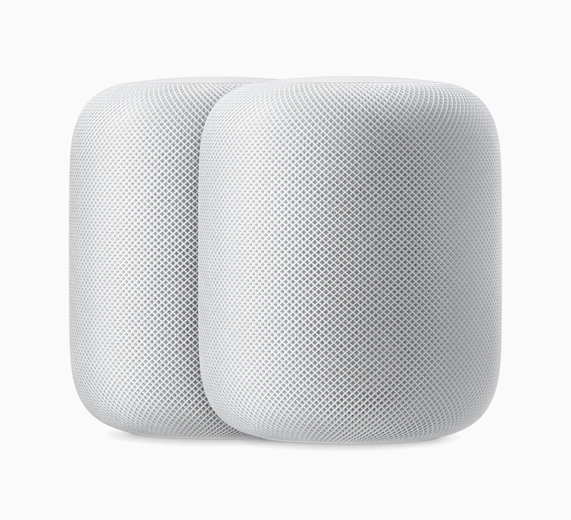
A photo of two white HomePods sitting side by side.
Stereo pairs create an even wider soundstage for an incredible listening experience on HomePod.
HomePod is a convenient way to send messages, set timers and reminders, check calendar appointments and the weather, control a wide range of HomeKit smart home accessories and listen to more than 550,000 podcasts from Apple Podcasts. The latest headlines, entertainment news and sports updates stream directly to HomePod, and Univision Noticias, ESPN Deportes, Telemundo Entretenimiento and others are now available with support for Spanish.
Security and privacy are fundamental to the design of Apple hardware, software and services. With HomePod, information will only be sent to Apple servers after “Hey Siri” is recognised locally on the device, via an encrypted and anonymous Siri identifier.
Pricing and Availability
  • HomePod is available in Australia, Canada, France, Germany, the UK and US, and will be available in Mexico and Spain starting October 26. HomePod is available in white and space grey at an Apple retail price of $349 (US) from Apple Stores, apple.com, the Apple Store app and at select Apple Authorised Resellers.
  • HomePod is compatible with iPhone 5s or later, iPad Air or later, iPad mini 2 or later, iPad Pro or iPod touch (6th generation). By default, HomePod automatically installs new software updates. For more information on how to manually check for software updates on the Home app on iOS, visit Apple Support. The iOS device used for setup must be updated to the latest version of iOS.
APPLE STATEMENTOctober 4, 2018

What Businessweek got wrong about Apple


The October 8, 2018 issue of Bloomberg Businessweek incorrectly reports that Apple found “malicious chips” in servers on its network in 2015. As Apple has repeatedly explained to Bloomberg reporters and editors over the past 12 months, there is no truth to these claims.


Apple provided Bloomberg Businessweek with the following statement before their story was published:


Apple never had any contact with the FBI or any other agency about such an incident. We are not aware of any investigation by the FBI, nor are our contacts in law enforcement.On this we can be very clear: Apple has never found malicious chips, “hardware manipulations” or vulnerabilities purposely planted in any server.


In response to Bloomberg’s latest version of the narrative, we present the following facts: Siri and Topsy never shared servers; Siri has never been deployed on servers sold to us by Super Micro; and Topsy data was limited to approximately 2,000 Super Micro servers, not 7,000. None of those servers have ever been found to hold malicious chips.

 Each time, we have conducted rigorous internal investigations based on their inquiries and each time we have found absolutely no evidence to support any of them. We have repeatedly and consistently offered factual responses, on the record, refuting virtually every aspect of Bloomberg’s story relating to Apple. Over the course of the past year, Bloomberg has contacted us multiple times with claims, sometimes vague and sometimes elaborate, of an alleged security incident at Apple.

We are deeply disappointed that in their dealings with us, Bloomberg’s reporters have not been open to the possibility that they or their sources might be wrong or misinformed. Our best guess is that they are confusing their story with a previously-reported 2016 incident in which we discovered an infected driver on a single Super Micro server in one of our labs. That one-time event was determined to be accidental and not a targeted attack against Apple.
While there has been no claim that customer data was involved, we take these allegations seriously and we want users to know that we do everything possible to safeguard the personal information they entrust to us. We also want them to know that what Bloomberg is reporting about Apple is inaccurate.
Despite numerous discussions across multiple teams and organisations, no one at Apple has ever heard of this investigation. Businessweek has refused to provide us with any information to track down the supposed proceedings or findings. Nor have they demonstrated any understanding of the standard procedures which were supposedly circumvented. 
No one from Apple ever reached out to the FBI about anything like this, and we have never heard from the FBI about an investigation of this kind — much less tried to restrict it. 
In an appearance this morning on Bloomberg Television, reporter Jordan Robertson made further claims about the supposed discovery of malicious chips, saying, “In Apple’s case, our understanding is it was a random spot check of some problematic servers that led to this detection.”
As we have previously informed Bloomberg, this is completely untrue. Apple has never found malicious chips in our servers.
Finally, in response to questions we have received from other news organisations since Businessweek published its story, we are not under any kind of gag order or other confidentiality obligations.

Friday, 12 October 2018

September 19, 2018

Apple Watch Series 4:
The reviews are in


After several days of testing, reviewers around the world are sharing their impressions of the redesigned, re-engineered Apple Watch Series 4: 


   USA Today
     “Bigger display, fall detection and ECG may make it the time to upgrade.”
    
“The new Apple Watch health and fitness features make it a powerful device for your overall well-being. That’s because game-changing bells and whistles have elevated the Apple Watch Series 4 from an investment-worthy health accessory to a sleek and beautiful device that actually might save your life.”

iJustine
“This screen makes it feel like I’m watching a freaking IMAX movie!”

Hodinkee
“It's cohesive, it's ambitious, and it might just encourage you to reshape your habits and behaviours for the better. If you still haven't given the Apple Watch a shot and you've been waiting for the right moment, this is that moment. Go for it."
TechCrunch
“Apple Watch is an elegant solution from both a hardware and software standpoint. It walks the key wearable line of being engaging when necessary and fading into the background the rest of the time.”
Men’s Journal
“Honestly, this is really not a commercial for Apple, but more a commercial for cool things I happen to like — and this is one of them — but the fact that they put some thought into making something that basically is looking out for you is a pretty great move." — Jon Hamm
Refinery29
“This is the first Apple Watch that really feels like it lives up to Apple's original vision for the wearable. The bigger display, improved speaker quality, gorgeous watch faces, and advanced health and fitness features make the $399 starting price seem worth it."
The New York Times
“The new Apple Watch is perhaps one of the most significant developments in wearable gadgets in years.”
The Independent (UK)
“The design is just gorgeous and the bright, vivid display with its narrow, curved bezels, looks sensational. The uptick in performance power is noticeable at every level and the increased health qualities and fitness monitoring are hugely welcome. If you've held back from getting an Apple Watch because you thought it wasn't quite there yet, well, it is now."
Wareable (UK)
“The ease and availability of cellular, the accuracy and usefulness of its heart rate monitor and the breadth of its fitness ecosystem — these are the areas that have left rivals in its dust. Add Apple Pay, SOS, fall detection, the heart rate alerts — it’s incredible to think that the Apple Watch Series 4 will, undoubtedly, save at least one person’s life.”
MobileSyrup (Canada)
“Apple has managed to define what the modern smartwatch is. Rather than a device designed to replace your smartphone, the Apple Watch is a companion that features expansive health functionality and delivers notifications to your wrist.”
Best Health (Canada)
“I'm obsessed with the heart rate features. I was already using my Apple Watch to check on my heart rate during exercise, and I love that the Series 4 will send me a notification if my heart rate appears low.”
Vogue Australia
“It’s absolutely incredible what Apple has done in just a few short years with a piece of technology you wear on your wrist.”
The Straits Times (Singapore)
“The Apple Watch Series 4 cements Apple’s dominance in the smartwatch arena with its sleek design, useful health features and superb performance.”
Customers can order Apple Watch Series 4 (GPS + Cellular and GPS) on apple.com/in and in the Apple Store app. Apple Watch Series 4 (GPS + Cellular and GPS) will be available starting Friday, September 21, from apple.com/in, the Apple Store app and Apple Stores.


macOS Mojave is available today


Update Brings Dark Mode, Stacks, New Apps, a Redesigned Mac App Store and More
macOS Mojave, the latest version of the most advanced desktop operating system, is now available as a free software update for Mac users. macOS Mojave brings a number of new features to the Mac, including Dark Mode which transforms the desktop with a dramatic dark colour scheme, and a new Dynamic Desktop with a series of time-shifting images to match the time of day. The Mac experience is also enhanced with the arrival of familiar iOS apps, including News, Stocks, Voice Memos and Home, and a redesigned Mac App Store featuring rich editorial content that makes finding the right Mac apps easier than ever.


                     Stacks: A Clutter-Free Desktop

Stacks quickly clears cluttered desktops by automatically organising files into neat groups based on file types like images, presentations, PDFs and text documents. Stacked files can be easily accessed by clicking to expand a Stack and then opening a file.Users can also customise Stacks to sort based on other file attributes, including date and tags. 


Finder: Do More Than Ever Before
Finder in macOS Mojave features an all-new Gallery View that lets users skim through files visually, while a Preview Pane shows all of a file’s metadata, making it easier to manage media assets. Quick Look now lets users rotate and crop images, mark up PDFs and trim video and audio clips and can be accessed by selecting a file and pressing the keyboard space bar.Quick Actions now appear in the Preview Pane within Finder and allow users to do things like create and password-protect PDFs, and even run custom Automator Actions.

Continuity Camera: Seamless Integration Across Mac and iPhone


With Continuity Camera users can shoot or scan a nearby object or document using their iPhone, and have it appear on their Mac. Users need to simply choose “Import From” in Pages, Keynote, Numbers, Notes, Mail and other supported apps to scan or shoot using their nearby iOS device.

New Apps: News, Stocks, Voice Memos and Home

Familiar iOS apps including News, Stocks, Voice Memos and Home come to the Mac for the first time, allowing users to do more than ever right from their desktop. With Home, users can control their HomeKit-enabled accessories, from turning on lights to adjusting a thermostat or checking a baby monitor. And Voice Memos makes it easy to record personal notes, lectures, meetings, interviews or song ideas with the Mac’s built-in microphone and then later access them through iCloud from iPhone, iPad or Mac.


Safari: Surf the Web With Better Safety

In Safari, enhanced Intelligent Tracking Prevention helps prevent social media “Like” or “Share” buttons and comment widgets from tracking users without permission. Safari also presents simplified system information when users browse the web to prevent data companies from creating a unique “fingerprint” that can be used for tracking. To help users better manage their passwords, Safari now automatically creates, autofills and stores strong passwords when creating new online accounts and flags reused passwords so users can change them.


Walmart says it will stop selling e-cigarettes

Walmart will stop selling e-cigarettes because of “regulatory complexity and uncertainty” surrounding the products.  CNBC reported  on an ...